Study Focus Tracker
PrototypeA webcam focus monitor built on MediaPipe Face Mesh and OpenCV. It classifies each moment of a study session into one of four states and generates a session report with a timeline and eye-openness chart.
- Python
- MediaPipe
- OpenCV
- Matplotlib
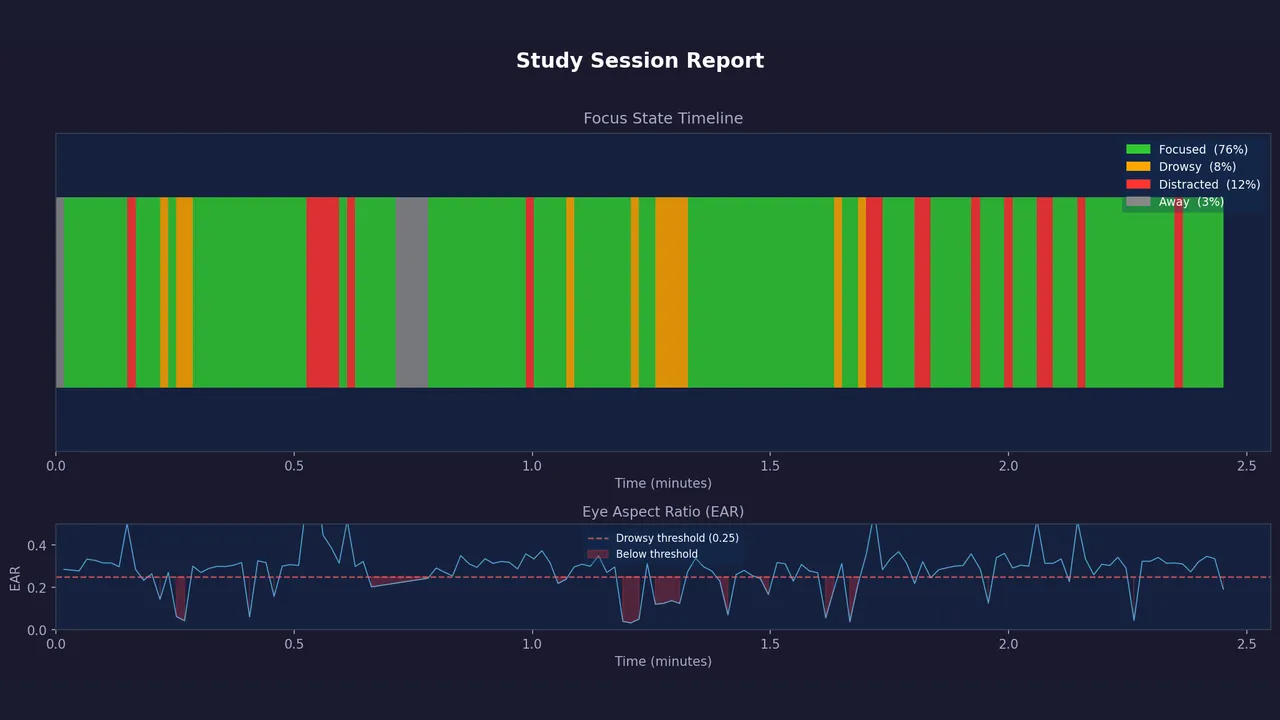
Study Focus Tracker runs in the background while you study and tells you, after the session, how much of that time you were actually focused.
What it does
Every frame from the webcam is classified into one of four states:
| State | Condition |
|---|---|
| Focused | Facing forward, both eyes open |
| Drowsy | Eyes mostly closed for 20+ consecutive frames |
| Distracted | Head turned more than 30% of face width off-center |
| Away | No face detected for more than 3 seconds |
When you quit, report.py turns the session log into a chart: a color-coded
focus timeline with the share of time in each state, plus the eye openness
signal over time.
How it works
MediaPipe Face Mesh gives dense facial landmarks on each frame. Drowsiness uses the Eye Aspect Ratio, the same signal as my drowsy driver project. Head turn is kept simple and 2D: how far the nose sits from the center of the face, divided by face width. Each frame’s state and EAR are written to a CSV, which the report script reads to build the chart.
What I learned
Simple signals go far when they’re tuned well. There’s no 3D head pose math here, just two ratios and a few thresholds, and the thresholds are exposed at the top of the script so anyone can adjust how strict it is. Building the report also taught me that tracking is only half the product. The summary is what makes the data useful to the person.